Badavas Server API Documentation
By Nathan Tao
Important Types (for Typescript)
User
Represents a single user.
export interface User {
  type: UserType;
  uid: string;          // user id
  username: string;
  description: string;
  wants: string;
  website: string;      // unused, ignore for now
  email: string;
  youtube: string;      // unused, ignore for now
  snapchat: string;     // unused, ignore for now
  instagram: string;    // unused, ignore for now
  facebook: string;     // unused, ignore for now
  tiktok: string;       // unused, ignore for now
  cscore: number;       // a metric representative of a user's
                        // contribution to the Badavas community
  verified: VerificationState;
  supporter_banner_url: string | null;
  avail: boolean;       // whether the user is available for partnerships
};
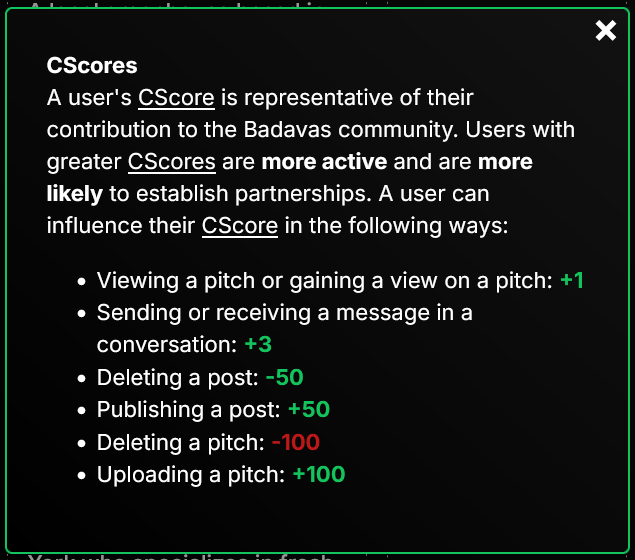
Here is how CScore is described on the V2 computer site:
UserType
Not super relavant right now. Either ignore or display on the user's profile whether they are a company or individual. Both company and individual accounts have equal access to content.
export enum UserType {
  company,
  individual,
};
VerificationState
Ask me (Nathan) for the application criteria for a user to achieve the next “level” of verification.
export enum VerificationState {
  unverified,
  email_verified,
  business_verified,
  integrity_verified,
  dedication_verified,
  full_trust,
};
ERROR
export interface ERROR {
  errorDesc: string;
  errorID: string;    // a jumbled string identifying the error, just
                      // display this value to the user if an error occurs
};
Handling ERRORs
if (!res.ok) {
  const errorData = await res.json();

  alert(
`Oh no! You found an error!

Status: ${res.status}
Error Code: ${errorData.errorID}
Description: ${errorData.errorDesc}

If you believe this error should not have occurred, please report this as an issue. We recommend you screenshot this message and record the error code.`
  );

  return;
}
Conversation
export interface Conversation {
  otherUser: User;
  unreadMessage: boolean;
  acceptedConv: boolean;   // unused, ignore for now
};
Message
Sent in a conversation.
export interface Message {
  sender: User;
  reciever: User;
  timeSent: string;   // date string, convert to date object: new Date(messageObj.timesent)
  message: string;   // the text of the message, kinda weird naming ik why name two things message... well it was from an older version of the site
};
Post
Not in terms of "POST request", but rather the "posts" feature on our website.
export interface Post {
  postid: string;    // can be used in endpoints to reference the post
  sender: User;      // the post's author
  timesent: number;  // to convert to date object: new Date(postObj.timesent), for some reason this timesent propery is a number while the timesent property for the Message interface is a string...
  title: string;
  value: string;     // the content of the post in sanitized HTML
  replyTo: null;     // unused, ignore for now
};
POST Requests
POST requests will be subdivided into two types. In my frontend code, I access “type 1” endpoints using forms and “type 2” endpoints using the Fetch API. Type 1 endpoints tend to be used for file uploading, whereas type 2 endpoints serve all other purposes.
Type 1 POST Endpoints
Type 1 POST Endpoints can be accessed at https://dev.badavas.com/api/.
/upload-pfp
Utilized to upload profile pictures. It is recommended that you convert the image into 100x100 px (any method of doing this suffices). The uploaded image must be less than 100 KB in size.
Badavas Super Supporters may upload images of type png, jpg, or gif. Other users may only upload files of type png or jpg.
Minimal setup from client:
<form
  action="/api/upload-pfp"
  encType="multipart/form-data"
  method="post"
>
  <input
    type="file"
    id="pfp-input"    // must be pfp-input
    name="pfp-input"  // must be pfp-input
    accept={`image/png, image/jpeg${isSuperSupporter ? ", image/gif" : ""}`}
  ></input>
  <input
    type="submit"
  ></input>
</form>
/upload-pitch
Utilized to upload pitches. It is recommended that you convert the video into 1080 px width and 1920 px height (any method of doing this suffices). The uploaded video must be less than 50 MB in size and be of type mp4 or mov.
Minimal setup from client:
<form
  action="/api/upload-pitch"
  encType="multipart/form-data"
  method="post"
>
  <input
    type="file"
    id="pitch-input"    // must be pitch-input
    name="pitch-input"  // must be pitch-input
    accept="video/mp4,video/mov"
  ></input>
  <input
    type="submit"
  ></input>
</form>
Type 2 POST Format
Minimal Type 2 POST request:
try {

  const res = await fetch("https://dev.badavas.com/api2/sign-in", {
    method: "POST",
    headers: {
      "Content-type": "application/json",
    },
    body: JSON.stringify([
      "example_username",  // ARGUMENTS GO HERE
      "example_password",
    ]),
  });

} catch (err) {
  console.log(err);
}
Example Function for Sending Type 2 POST Requests
export const post = async (action: string, data: any[]): Promise<any> => {
  try {

    const res = await fetch(`https://dev.badavas.com/api2/${action}`, {
      method: "POST",
      headers: {
        "Content-type": "application/json",
      },
      body: JSON.stringify(data),
    });

    if (!res.ok) {
      const errorData = await res.json();

      // handle error, see Important Types (for Typescript) > ERROR > Handling ERRORs

      return;
    }

    // these actions return BLOBs
    const blobActions = new Set(["get-profile-image", "get-pitch", "get-pitch-thumbnail"]);

    return blobActions.has(action) ? res.blob() : res.json();

  } catch (err) {
    console.log(err);
  }
};
Type 2 POST Request Endpoints
Type 2 POST endpoints can be found at https://dev.badavas.com/api2/.
/get-curr-user
Parameters:
None
Returns:
User if the user is logged in.
false if the user is not logged in.
ERROR if the server cannot resolve a problem.
/sign-out
Parameters:
None
Returns:
true if the sign out process succeeds.
ERROR otherwise.
/get-user
Parameters:
- A
stringrepresenting the user id of the user to retrieve.
Returns:
User if the user exists and is successfully retrieved.
ERROR otherwise.
/get-all-users
Try to minimize use of this endpoint in favor of endpoints that transfer less data (e.g. /get-user, /get-recommendations).
Parameters:
None
Returns:
User[] if successful.
ERROR otherwise.
/create-user
Creates a user by the sign up process (NOTE: Verification email must be sent separately, using /send-verif-email). Follow User Property Rules for property inputs.
This endpoint also automatically signs in the user.
Parameters:
- A
UserBlueprintobject representing the user to create.
a. PRECONDITION:userBlueprint.uidhas not been taken. Use /check-uid-validity to ensure this.
b. PRECONDITION:userBlueprint.emailhas not been taken. Use /check-email-validity tp ensure this.
c. PRECONDITION: Length limits are satisfied (seeUserBlueprintdefinition.)
Returns:
true if successful.
false if no unexpected errors but email invalid.
ERROR otherwise.
Specific Associated Types:
User Blueprint
interface UserBlueprint {
  uid: string;  // 1 <= length <= 30
  type: UserType;  // irrelavant, just set a random value
  username: string;  // 1 <= length <= 65
  email: string;  // 1 <= length <= 255
  password: string;  // 1 <= length <= 256
  description: string;  // 50 <= length <= 256 or length = 0*
                        // (*NOTE: There is an option to leave no description.
                        //         this is the only case where the length may
                        //         equal exactly 0 and less than 50.
                        //         A similar idea goes for the wants.)
  wants: string;  // 50 <= length <= 256 or length = 0*
  loginmethod: "regular" | "google";
};
/att-verif
Deprecated. Do not use.
/update-user
Updates the currently logged in user. You will have to call /get-curr-user to get the updated User object representing the current user.
Parameters:
- A
UserEditablePropertyrepresenting the property of the current user to update.
a. PRECONDITION: If the current user is not a Badavas Super Supporter (which can be identified through /get-is-supporter), the property to update may NOT begin with"supporter_". In other words, only Badavas Super Supporters may update properties associated with Badavas Super Supporters. - An
anyrepresenting the new value for the property. Follow User Property Rules for property inputs.
a. NOTE: When updating theavailuser property, do not input a boolean. Instead, input1fortrueand0forfalse.
Returns:
User representing the updated user, if updating is successful.
ERROR otherwise.
Specific Associated Types:
UserEditableProperty
type UserEditableProperty = "uid" | "type" | "username" | "description" | "wants" | "email" | "supporter_banner_url" | "password" | "avail";
/reload-curr-user
Unclear use case. Use to ensure the current user object is synced with the current user's object in the database. /get-curr-user has to be used after calling this method to obtain the most recent user. Safe to ignore.
Parameters:
None
Returns:
true if successful user reload.
ERROR otherwise.
/check-uid-validity
Returns whether a user ID is available or taken. Primary use case is when setting a user's ID to ensure that the new value is valid.
Parameters:
- A
stringrepresenting the user ID to check.
Returns:
true if user ID is available.
false if user ID is taken or server encountered an error.
/check-email-validity
Returns whether an email is available or taken.
Parameters:
- A
stringrepresenting the email to check.
Returns:
true if the email is available.
false if the email is taken or server encountered an error.
/sign-in
Attempts to sign in and updates the current user if the sign in process is successful.
Parameters:
- A
stringrepresenting the user ID of the user attempting to sign in. - A
stringrepresenting the password of the user attempting to sign in.
Returns:
true if the user ID and password match, and no error is encountered (i.e. sign in is successful).
false otherwise.
/get-conversations
Returns all the conversations associated with the current user
Parameters:
None
Returns:
Conversation[] representing the conversations associated with the current user, if conversation retrieval is successful.
ERROR otherwise.
Realtime Messaging:
We use socket.io for realtime messaging. The following is an example react.js hook that outputs a live-updating variable associated with the current user's conversations.
The server emits an "nm" (new message) event every time the current user sends or recieves a message.
import { useEffect, useState } from "react";
import { io } from "socket.io-client";
// more types have to be imported here as well

export const useConversations = (currUser: User): Conversation[] => {
  const [socket, setSocket] = useState<Socket>();

  const [conversations, setConversations] = useState<Conversation[]>([]);

  useEffect(() => {
    // assume getConversations() retrieves the messages from
    // the /get-conversations endpoint and handles potential errors
    getConversations().then((res: Conversation[]) => {
      setConversations(res);
    });

    // create socket by sharing our current user's user ID
    setSocket(io({ query: { thisUID: currUser.uid } }));
  }, []);

  useEffect(() => {
    if (!socket) return;

    // listen for new messages
    socket.on("nm", async () => {
      const convs = await getConversations();
      setConversations(convs);
    });

    return () => {
      socket.off("nm");
    };
  }, [socket, conversations]);

  return conversations;

};
/get-messages
Returns the messages the current user has with another user.
Parameters:
- A
stringrepresenting the user ID of the “other” user (the user that is messaging / being messaged by the current user). - An integer
number, “limit”, that represents the number of messages to obtain (most recent messages are obtained first).
a. For reference, the computer site starts at25for this parameter and increases this limit by 25 after the user has scrolled through all sent messages. This endpoint has to be called again to obtain the next 25 messages, using50, then75, then100, etc. for this parameter.
Returns:
Message[] representing the first “limit” messages, sorted from most recent to least recent, if message retrieval is successful.
ERROR otherwise.
/send-message
This does what you think it does (iykyk).
Parameters:
- A
stringrepresenting the receiving user's ID. - A
stringrepresenting the message.
a. PRECONDITION: This string's length is greater than 0 and less than 1025 characters.
Returns:
true if message send is successful.
ERROR otherwise.
/get-pitch-count
Gets the number of pitches a user has.
Parameters:
- A
stringrepresenting the user ID of the user whose pitch count will be returned.
a. PRECONDITION: This user ID corresponds to a real user.
Returns:
number representing the number of pitches the user has, 0 if error.
/get-pitch-views
Gets the number of views a pitch has.
Parameters:
- A
stringrepresenting the user ID of the owner of the pitch.
a. PRECONDITION: This user ID corresponds to a real user. - An integer
numberrepresenting the index of the pitch amongst the user's pitches. Each pitch is identified by its owner and its index.
a. PRECONDITION: This number is less than the pitch count of the owner and greater than -1.
Returns:
number (integer) representing the requested pitch's views, if retrieval is successful.
ERROR otherwise.
/add-pitch-view
Adds a view to a pitch.
Parameters:
- A
stringrepresenting the user ID of the owner of the pitch.
a. PRECONDITION: This user ID corresponds to a real user. - An integer
numberrepresenting the index of the pitch amongst the user's pitches. Each pitch is identified by its owner and its index.
a. PRECONDITION: This number is less than the pitch count of the owner and greater than -1.
Returns:
true if successful.
ERROR otherwise.
/send-verif-email
Sends a verification email. The user, if preconditions are met, the email they claim is valid, and the email they claim is theirs, will recieve, by email, a verification code. Verifying to above level 1 is manual, and will be managed by the rest of the Badavas team.
Parameters:
- A
stringrepresenting the user ID of the user whose email should be verified.
a. PRECONDITION: The current user has not attempted to send a verification email in the last 60 seconds. Do NOT allow instantaneous resends (it will get blocked by the server).
b. PRECONDITION: The user's verification state is 0 (user.verified === 0).
c. PRECONDITION: User has already been created.
Why not just use the current user instead of having this parameter? Good question.
Returns:
true if successful.
false if no unexpected errors occured but the inputted email was invalid.
ERROR otherwise.
/activate-verif-code
Verification can occur on the main computer site. Once the verification email is sent using /send-verif-email, my computer site (which will have mobile-compatible verification pages) can handle the rest of the verification process (which includes this endpoint). You can ignore this endpoint.
Parameters:
- A
stringrepresenting the verification code.
Returns:
true if verification is successful.
false if no unexpected error occurred but the verification was prevented for some valid reason (wrong user, code expired).
ERROR otherwise.
/send-password-reset-email
Sends an email to reset the password. Given a user ID and an email. Checks for user ID—email correspondence.
Parameters:
- A
stringrepresenting the user ID associated with this password reset request. - A
stringrepresenting the email associated with this password reset request.
Returns:
1 if email was sent successfully.
2 if no user has both the given user ID and the given email.
3 if an unknown failure occurred.
/activate-password-reset-code
For a similar reason to /activate-verif-code, you may ignore this endpoint.
Parameters:
- A
stringrepresenting the password reset code. - A
stringrepresenting the new password.
Returns:
true if successful.
ERROR otherwise.
/check-pw-reset-code-is-valid
You can ignore this too.
Parameters:
- A
stringrepresenting a password reset code.
Returns:
true if the code is valid and no errors occurred.
false if the code is invalid (does not exist) and no errors occurred.
ERROR otherwise.
/get-root-posts
Get posts.
Parameters:
- Either
a. Astringrepresenting the user ID associated with a user whose posts should be retrieved or
b.nullto not filter posts. - An (integer)
numberrepresenting the number of posts to retrieve. Most recent posts will be retrieved first.
Returns:
Post[], sorted from most to least recent post, if successful.
ERROR otherwise.
/post-post
Posts a post.
PRECONDITION: The current user has not posted in the last 30 minutes, and the current user's verification level is greater than 0 (currUser.verified !== 0).
Parameters:
- A
stringrepresenting the content of the post, in sanitized HTML (will also be sanitized again in backend). - A
stringrepresenting the title of the post.
Returns:
true if successful.
ERROR otherwise.
/post-f-post
Posts the default “just-joined-Badavas” post. Poster does not have to have verification level greater than 0, but may not have greater than one post before this call, or ERROR 0xpPRT60150739, “User must be at least verification level 1 to post.”, 401, will be returned.
Parameters:
None
Returns:
true if successful.
ERROR otherwise.
/get-last-post-time
Gets the last time a user posted.
Parameters:
- A
stringrepresenting the user ID of the user whose last post time will be retrieved.
Returns:
number representing the requested user's last post time as a number of milliseconds since the UNIX Epoch, if no unhandled error was encountered, and the user has no undeleted posts.
0 if no unhandled error was encountered, and the user has no undeleted posts.
ERROR otherwise.
/delete-post
Deletes a post.
Parameters:
- A
stringrepresenting the ID of the post that will be deleted.
a. PRECONDITION: The owner of the specified post must be equivalent to the current, signed-in user.
Returns:
true if successful.
ERROR otherwise.
/delete-pitch
Deletes a pitch.
Parameters:
- A
number(integer) representing the index of the pitch to delete (among the pitches of the current, signed-in user).
Returns:
undefined if successful (don't question the inconsistency; if it ain't broke, don't fix it [im scared of breaking things]).
ERROR otherwise.
/get-post-count
Gets the number of non-deleted posts (potentially owned by a specific user).
Parameters:
- A
stringrepresenting the user ID of the user whose non-deleted post count should be found, ornullto find the total number of posts.
Returns:
number, the count of non-deleted posts under the selected constraints, if successful.
ERROR otherwise.
/get-random-users
Randomly gets and returns a specified number of verified (verification level > 1) users.
Parameters:
- A
numberrepresenting the number of users to return, if possible.
Returns:
User[], the array of random users, if successful.
ERROR otherwise.
/get-message-count
Gets the number of messages in a conversation between the current user and another user.
Parameters:
- A
stringrepresenting the uid of the “other” user in the conversation (i.e. the user that the current user is sending / recieving messages to / from).
Returns:
number (integer) representing the message count, if successful.
0 otherwise.
/get-pitch-thumbnail
Gets the thumbnail of a pitch.
Parameters:
- A
stringrepresenting the user ID of the owner of the pitch.
a. PRECONDITION: This user ID corresponds to a real user. - An integer
numberrepresenting the index of the pitch amongst the user's pitches. Each pitch is identified by its owner and its index.
a. PRECONDITION: This number is less than the pitch count of the owner and greater than -1.
Returns:
A blob with a 1-frame video (do not question why this returns a video instead of an image) representing the thumbnail of the pitch, if successful.
ERROR otherwise.
/get-pitch
Gets a pitch.
Parameters:
- A
stringrepresenting the user ID of the owner of the pitch.
a. PRECONDITION: This user ID corresponds to a real user. - An integer
numberrepresenting the index of the pitch amongst the user's pitches. Each pitch is identified by its owner and its index.
a. PRECONDITION: This number is less than the pitch count of the owner and greater than -1.
Returns:
A blob with the pitch video.
ERROR otherwise.
/similarity
Gets the Badavas AI similarity score between two users.
Parameters:
Returns:
SimilarityData if successful.
ERROR otherwise.
Specific Associated Types:
SimilarityData
interface SimilarityData {
  score: number;  // 0-100 with 1 digit after the decimal point
  justification: string;
};
/get-recommendations
Recommends and outputs 3 users that would partner well with the current user out of a psuedorandomly generated subset (max size 100) of the whole user set.
Basically recommends partnerships, with potential for different recommendations if this endpoint is called again.
Parameters:
None
Returns:
[RecommendationData, RecommendationData, RecommendationData] representing the 3 users that were recommended, if successful.
ERROR otherwise.
Specific Associated Types:
RecommendationData
type RecommendationData = [User, number][]; // number = similiarity score between current user and the User in this tuple
/suggest
Locates and outputs 3 users that correspond to a search query.
Parameters:
- A
stringrepresenting the search query. - A
number. Deprecated, set to3.
Returns:
[User, User, User] representing the 3 users that were recommended, if successful.
ERROR otherwise.
/get-accessed-uids
Returns whitelisted users. Your site should have a “whitelist” mode where only whitelisted users can enter the site (all users can sign up, but only whitelisted users can access the full site, whereas non-whitelisted users can only sign up, sign in, view the home page, reset their password [which will be partially handled by the computer site], and verify [which will also be partially handled by the computer site]).
Parameters:
None
Returns:
string[] containing the UIDs of the whitelisted users, if successful.
ERROR otherwise.
/get-is-supporter
Returns whether a given user is a Badavas Super Supporter.
Parameters:
- A
stringrepresenting the user ID of the user to query.
Returns:
true if the requested user is a Badavas Super Supporter, and no unhandled exceptions occurred.
false if the requested user is not a Badavas Super Supporter, and no unhandled exceptions occurred.
ERROR otherwise.
GET Requests
Assuming you program using React, any endpoint you send a GET request to will direct to your index.html file. History manipulation and varying behavior based on path should be handled on the frontend, and your React code should be able to respond to starting in different URLs.
User Property Rules
Notice some properties max at powers of 2, others max at one less than a power of two, and some max at one more than a power of two (what???). Do not question these choices :>
Also note: new lines must be counted as characters.
| Property Name | Conditions |
|---|---|
| supporter_banner_url | 0-256 chars long, represents png, jpeg, jpg, or gif |
| username | 1-65 chars long, does not contain {, }, Business A, Business B, Businesses A and B, Businesses B and A |
| uid | 1-30 chars long, only contains lowercase alphanumeric chars, _, or - (no en/em dashes). Unique |
| 1-255 chars long, whole string resembles an email format (you can find regex online for matching potentially valid emails) | |
| password | 1-65 chars long, does not contain backslashes |
| description | 100-256 chars long |
| wants | 100-256 chars long |
| type | 0 or 1, 0 == company account, 1 == individual account |
yayayay finally this is the end
lmk if there are any issues with this documentation by sending an email to natnu212@gmail.com
if a precondition to some endpoint seems like it should exist but does not exist (or was not written), let me know!
:>